The AI System I Built to Run My Freelance Life
Some links below are affiliate links. I only recommend tools I actually use.
For years I ran everything from my head. It sort of worked, until it didn’t. And the problem was never really forgetting one thing here and there. It was waking up with no idea where to start. What to work on. What actually mattered that day. Where my time should go. That fog turned into procrastination, and procrastination killed whatever will to work I had left.
My wake-up call was small and stupid. I forgot to pay my car insurance. Not because I was short on time or money. I just forgot the due date. Actually, I forgot completely, until my accountant called me three days after the policy had already lapsed to tell me I still hadn’t paid it. That was the week I decided to stop being my own calendar and build something that would remember for me.
The stack at a glance
| Tool | What I use it for | Cost | My take |
|---|---|---|---|
| Claude Code (Claude in VS Code) | I built “agents” that run my calendar, notes, reminders and email, so I always know what’s on for today and tomorrow | Claude subscription | The engine. There’s a learning curve, but nothing else lets me build an assistant this personal |
| Apple Calendar + Reminders + Notes (iPhone) | Where everything lands and where the notifications reach me on the go | Free | On their own they’re dumb. But they’re how the system reaches me when I’m away from the laptop |
| Notion | Pulling everything into one hub plus an auto-updating finance page | Free / paid | Slowly becoming my single source of truth. It only works because the AI keeps it updated |
| Claude (Sonnet 4.6 / Opus 4.8) | Polishing my client messages; I pick the model by task to manage cost | Included | A second pair of eyes on everything I write |
The heart: the agents I built in Claude Code
I didn’t buy a productivity app. I built my own assistant inside Claude Code (Claude running in VS Code), as a handful of small “agents” that each do one job for me. Here’s what they actually do, every day.
A morning brief at 8am, straight to my WhatsApp. Before I even open my laptop, my phone buzzes with today’s weather (so I know what to wear), the news from the last 24h that actually matters to me, and everything I’ve planned and committed to. Today and tomorrow.
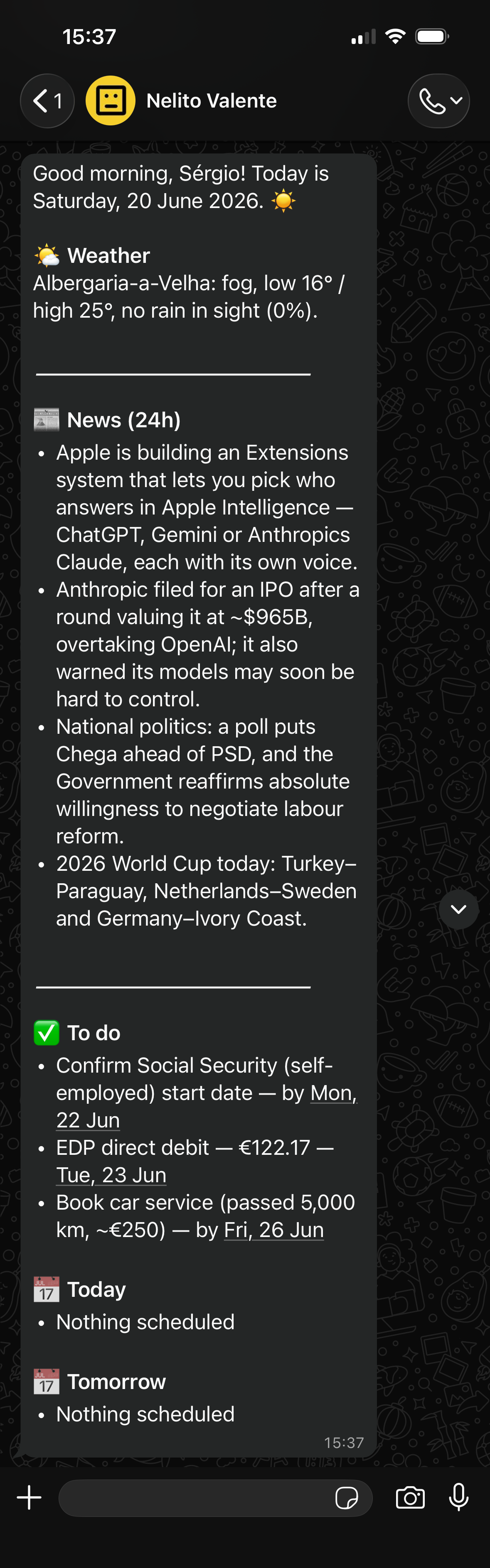
It runs my inbox. It reads and sorts my email, tells me what’s important and what’s urgent, and logs anything with a deadline straight into my reminders and calendar. So nothing lives only in my head anymore.
It writes with me. I draft a message my way, and it cleans it up into something clear that still sounds like me, not like a robot. It also does quick market research when I need it.
It gets better over time. This is the strange part. It helps me build new functions for itself, so it’s a little more useful every week.
And one just for me. I built a “sensei” agent that teaches me English and Japanese. It makes exercises, tests me, grades them, and keeps track of exactly what I need to work on.
I’m also putting together a full walkthrough of how I built all this, from connecting Claude Code to VS Code to setting up the agents. I’ll share it with my email list once it’s ready.
It isn’t perfect, and I won’t pretend it is. For a while it kept assuming I already knew how to do things I’d never done, so I was always stopping to explain what I couldn’t do. That got frustrating. I’ve fixed a good part of it by being upfront about my own limits. And there’s still one thing it can’t do yet: see my spending in real time. That’s the next thing I’m building.
The other pieces
The phone apps (Apple Calendar, Reminders, Notes). My system lives in Claude Code on my laptop, and I’m not always at my laptop. So the native iPhone apps are where everything lands. My agents write to them, and when I’m out I just open my phone to check my calendar, reminders and notes, and get the notifications. The AI does the thinking. The phone is where it reaches me.
Notion, the hub I’m building. Everything my agents scatter across those apps, I’m slowly pulling into one Notion page so I stop hopping from app to app. The part I’m most excited about is a finance page. My Claude Code agents update my spending and income on their own, and keep a live track of my invoices: which ones I’ve sent, which got paid, and which are still owed.
What my day looks like now
Now my day starts before I even open my laptop. At 8am my phone buzzes, and in thirty seconds I know what the day looks like. No more waking up in fog, no more wondering where to begin.
Two things changed that I didn’t expect. The first is that I haven’t forgotten a single commitment since. That low background anxiety of “am I missing something?” is just gone. The second is that the repetitive stuff, sorting email, cleaning up texts, quick research, my agents handle all of it. So my energy goes into the actual work instead.
And honestly? It’s motivating in a way I didn’t see coming. I love tech, and having a little “AI” I built myself that helps me with everything feels like living in 2035. That feeling alone gave me back the drive I’d lost.
What I tried and dropped
I’ve tried a couple of personal finance apps. Moneyboard and Wallet by BudgetBakers, the kind where I logged every expense and every bit of income by hand. They all died the same way. I’d get tired of typing things in, fall behind, and then dread having to rebuild a whole month at once. So I never really knew where my money was quietly leaking.
Here’s the honest part. Notion would fall into the exact same trap if I had to fill it in by hand. The only reason it works this time is that my agents do the logging for me. The moment a human has to remember to log something, the system dies.
The one manual thing that survived is iPhone Notes. And it survives precisely because I barely use it. I only open it for something genuinely important, and then I write it right there, on the spot.
Quick questions
Do I need to know how to code to build this? Not really. Claude Code does the heavy lifting. You mostly describe, in plain words, what you want it to do for you. Being comfortable opening a terminal helps, but you’re directing it, not programming.
Isn’t this overkill? Why not just use a to-do app? Because every app I tried needed me to remember to use it, and that’s exactly where I always failed. The whole point here is that the AI does the remembering and the logging, not me.
What does it cost? A Claude subscription is the only real cost. The phone apps are free, and Notion’s free plan is enough to start. You’re paying for the assistant, not for ten separate tools.
Want to get organized without the code?
Building this in Claude Code took some patience, and honestly it’s more than most people need. If you just want a clean Notion setup to keep yourself organized, without touching any code, that’s something I can hand you directly. I make a Notion template built for exactly that.